Whether you want to enhance your survival world with friends or offer a unique experience to your community, datapacks are a simple solution to implement. They are also generally lighter than mods or plugins, meaning they consume fewer resources on your Hosterfy server.
What is a datapack?
A datapack is a collection of files used directly by Minecraft to modify the game's behavior. Datapacks were introduced in Minecraft 1.13 and have become increasingly popular ever since. However, their installation process is not always well documented. Unlike mods, datapacks do not require a loader such as Forge or Fabric. Instead, they rely entirely on Minecraft's built-in features.
A datapack can be used to add new crafting recipes, create quests or custom events, customize world generation, or improve various gameplay mechanics.
Before you begin
Before installing a datapack, make sure that:
- Your server is stopped.
- The datapack is compatible with your Minecraft version.
- You downloaded the datapack from a trusted source.
You can find datapacks on well-known community websites such as CurseForge or Modrinth. However, we always recommend verifying that the downloaded file is authentic, uncorrupted, and safe before installing it.
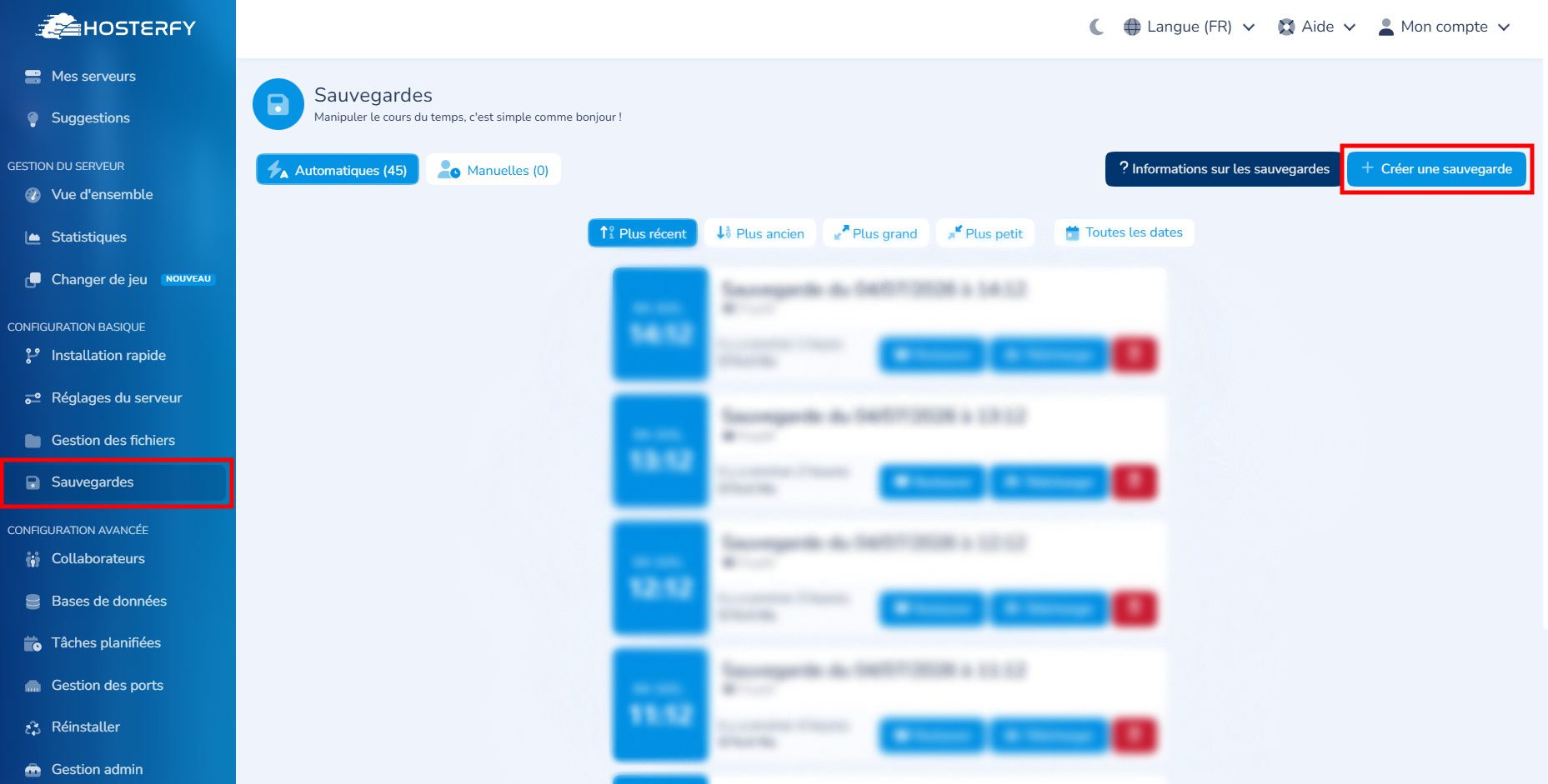
We also recommend creating a backup of your Hosterfy server before making any changes. This can be done from your game panel by navigating to Basic Configuration, then Backups, and clicking Create Backup in the top-right corner.
Step 1: Download the datapack
Download the datapack of your choice.
The file is usually provided as a .zip archive.
⚠️ We do not recommend extracting the archive unless the datapack creator explicitly instructs you to do so.
Step 2: Access your server files
You can access the built-in File Manager directly from your Hosterfy panel. For this type of operation, you may also use an SFTP connection. However, in this case, the File Manager is more than sufficient for transferring files from your computer to your Hosterfy server.
Step 3: Open the world folder
Depending on your configuration, your world folder may also be named world_nether, world_the_end, or have a custom name.
If the datapacks folder does not exist, simply create it. This should not cause any issues with the installation process.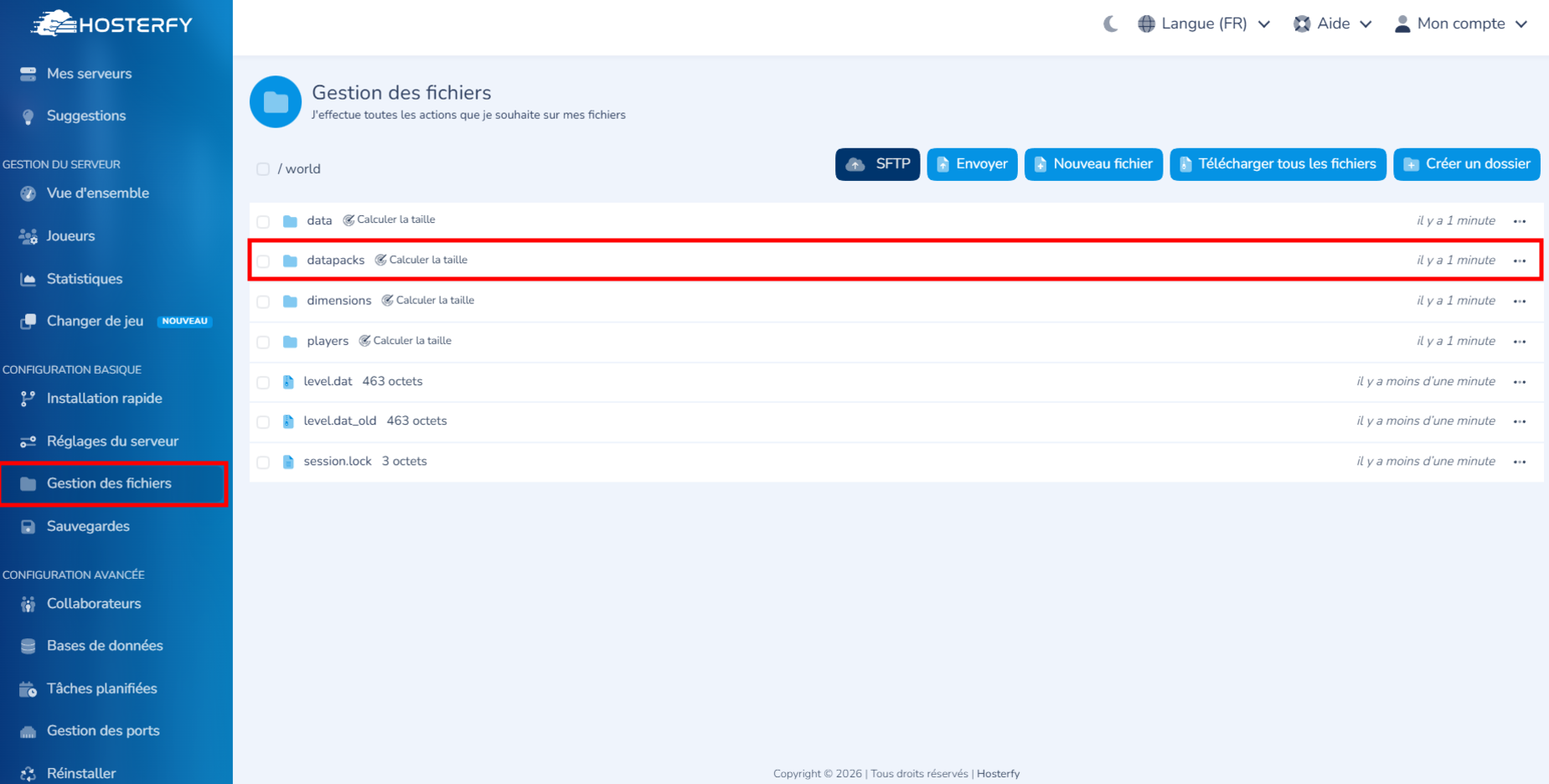
Step 4: Install the datapack
Simply drag and drop the datapack's .zip file into the datapacks folder.
Once the upload is complete, restart your server.
In our example, we will install the "Dungeons and Taverns" datapack, compatible with Minecraft 26.2. As its name suggests, this datapack adds dungeons, taverns, and many other structures that players can discover while exploring the world.
Step 5: Verify the installation
Once you're in-game, run the following command:
/datapack listIf everything is working correctly, your datapack will appear in the list of enabled datapacks.
In some cases, you may need to run the /reload command in-game to reload the datapack. However, keep in mind that this command may temporarily cause minor lag. Restarting your server is always the recommended approach to avoid potential issues with your other plugins and configurations.
Troubleshooting
If your datapack is not working, check the following:
- The datapack is compatible with your version of Minecraft.
- The file is still in .zip format and has not been extracted.
- The datapack is located in the correct folder (
world/datapacks). - The server is using the same world where the datapack was installed.
- The server was restarted after the installation.
Why use a datapack?
Datapacks are an excellent way to customize a Minecraft server without installing mods.
They allow you to create a custom survival experience, introduce unique gameplay mechanics, enrich the game without technical complexity, and maintain full compatibility with Vanilla Minecraft. Datapacks are generally easier to install and offer better compatibility than mods. Since they run entirely on the server, players do not need to modify their Minecraft client.
In contrast, mods usually require a loader such as Forge or Fabric and must be installed on both the server and every player's client.
Need help?
This guide was created using a Hosterfy Minecraft server.
Looking to host a multiplayer server for your friends or build your own community? We offer powerful, flexible, and feature-rich hosting plans. If you encounter any issues while installing a datapack, our team is always happy to help! ⚔️




Post a comment
Comments