Why does my Minecraft 1.18 server refuse to start?
In this guide, we will see how to fix the different problems that can prevent your Minecraft 1.18 server from starting.
Step 1: Identify the reason of the crash
If you get any of the following errors you can continue, otherwise go to the discord server for further help.
Minecraft 1.18 requires running the server with Java 17 or above. Download Java 17 (or above) from https://adoptium.net/
Unsupported Java detected (XX.0). This version of Minecraft requires at least Java 17. Check your Java version with the command 'java -version'
java.lang.UnsupportedClassVersionError: net/minecraft/bundler/Main has been compiled by a more recent version of the Java Runtime (class file version 61.0), this version of the Java Runtime
only recognizes class file versions up to XX.0
Step 2: Change the version of the executable
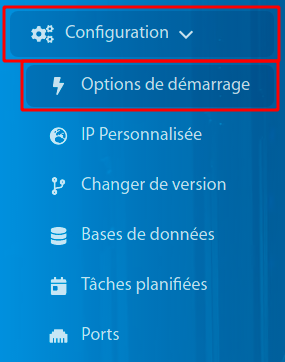
To start, you will have to go to the Game Panel, to Configuration and then to Startup Option.
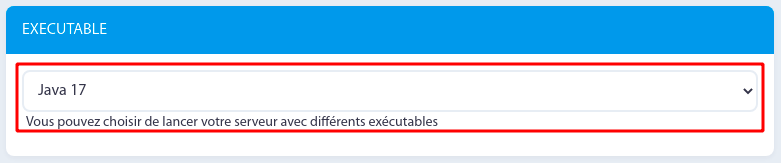
Select "Java 17" as executable.
Step 3: Restart the server
After having done all these manipulations, you will just have to restart your server and it's done.
If the problem persists, select Java 16 and then return to Java 17, this will solve the issue.
Don't hesitate to join our discord if you encounter any problem !



Post a comment
Comments